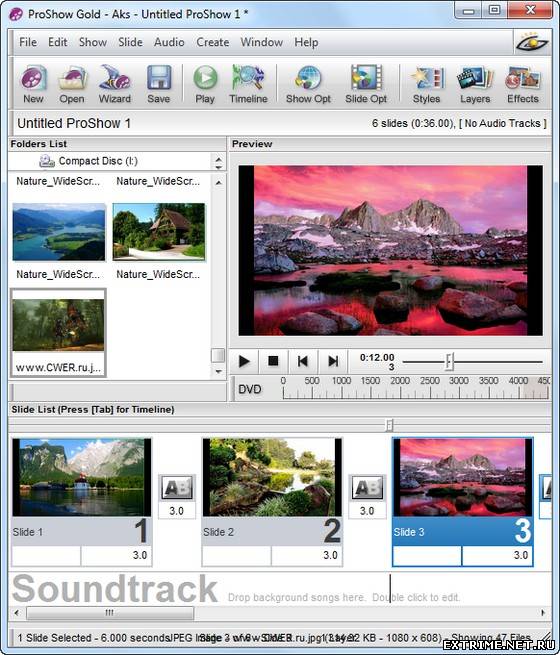
ProShow Gold - программа для
профессионального создания слайдшоу презентаций. Утилита поддерживает
работу со слоями и дает возможность использовать неограниченное число
слоев для каждого слайда. Программа поддерживает прозрачность для файлов
PSD, PNG, TIFF и GIF, дает возможность использовать маски слоя, эффекты
перехода, градиентную заливку или заливку цветом. Фотографии, из
которых состоит презентация, можно редактировать, применяя к ним такие
инструменты, как повышение четкости, изменение контрастности и
насыщенности цветов. Презентация может содержать подписи, в том числе и
анимированные, фоновую музыку. Готовый проект может быть сохранен в один
из 14 форматов, в том числе в HD Video, Flash и QuickTime. В отличии от
версии Producer данной программы, Gold-версия не имеет возможностей,
ориентированных на бизнес, но отлично подойдет для домашнего
использования.
Некоторые возможности:
Добавление неограниченного количества слоев для любого слайда
Поддержка функции Drag-and-drop
Поддержка более 100 форматов
Поддержка прозрачности для PSD, PNG, TIFF и GIF файлов
Добавление градиента или заливки как отдельного слоя для получения невероятных результатов
Применение эффектов перехода для отдельных слоев
Встроенные инструменты корректирования изображений (резкость, размытие, раскрашивание, насыщенность и т.д.)
Создание расширенных рамок для ваших фото и видео
Вырезание и поворачивание ваших фотографий и видео с точностью
Устранение эффекта "красных глаз" с помощью встроенного инструмента
Масштабирование по координатам X и Y индивидуально для каждого слоя
Полностью настраиваемая сетка предпросмотра слайдов позволяет точно установить позицию для ваших фото и видео
Контролирование шрифтов, размеров и цветов подписей к слайдам
Анимирование подписей к слайдам с помощью различных встроенных эффектов
Использование звукового сопровождения для ваших слайдов
Поддержка форматов WAV и MP3 для звукового сопровождения
Сохранение звуковых дорожек напрямую с CD-диска и прямое перетаскивание звуков в ваши слайды
И многие другие возможности...
What's New in This Release:
New! Create Shows Automatically
Wizard effortlessly builds complete shows with photos, videos, music and effects
Wizard intelligently adds effects and builds a custom show with your content
Nearly instant preview of your show - no need to wait for rendering
Wizard shows can be edited in ProShow for full creative control
Add photos, videos, text and music
Control order of content, trim videos, and edit text
Add your own custom soundtrack
Pick from 14 different themes
Create your own themes, and edit existing themes
Bias the energy level to create shows that are calm, or shows that are a little crazy
New! Over 110 New Transition Effects
New effects you can use in any show
Page curl, camera flash, gloss, curved path and more
ProShow Gold now includes over 390 transition effects
Add even more transitions with new Transition Packs
New! All New Transition Chooser
Completely redesigned interface for browsing and selecting transitions
Categories let you easily search similar effects
See the name and description of the selected effect
Single-click to preview, double-click to apply (or just select, and click 'Apply')
Drag the Transition Chooser to any spot on your screen
From the preferences, configure ProShow to open the Transition Chooser where you left it
Resize the Transition Chooser to control how much you see at once
New! New Interface for Creating a New Show
Improved New Show interface provides more options for starting a new show
Launch the wizard to build a show automatically
Create a new blank show, and specify the title and aspect ratio
Open any recently used show
Browse for an existing show to open
New Show interface opens automatically at startup (can be disabled)
New! Over 90 New Slide Styles
Apply these new effects to any slide
Focused on elegant and essential effects that work well in all shows
ProShow Gold now includes over 140 slide styles
New! Improved Video Creation
Support for HD uploads to Vimeo
Support for YouTube shows up to 15 minutes (previously limited to 10 minutes)
Enhanced the overall quality of several video formats when using the Device Output feature
Improved quality of MPEG 4 based video output
Other Changes and Improvements
Video trim values are now maintained when applying Slide Styles
Folders list now provides access to Windows Music and Videos folders
Fixed problem with audio clicks / blips at the beginning and end of audio tracks
Fixed crash condition in output processes caused by trimmed / cropped video layers
Fixed problems where layers in some shows could appear black
Fixed missing save confirmation process when opening show from outside ProShow and show is already open
Fixed quality problem affecting left channel of AAC based video output
Fixed problem where Windows Taskbar could cover Choose Transition dialog
Fixed video thumbnail option for Blu-ray menus
Fixed rare problem where progressive encoded video output could be interlaced
Fixed problem where layer Flip options could be reset when changing source files
Fixed typo in Synchronize Show to Soundtrack dialog
Fixed problems with AAC audio in video output
Fixed problems where the Total Time field in Slide Options could fail to update
Fixed startup problem caused by text setting in Windows 7
Fixed video import failure affecting some MOV files
Fixed the Pause button in DVD disc rendering dialog
Fixed problem where video rendering could appear to stall on some shows
Fixed problem where changing the source file for a video layer could incorrectly update slide time
Fixed label in list of caption texture scaling options
Fixed problem with missing right click menu for slide background image field
Fixed problem where current slide name could fail to appear in Rename Slide dialog
Fixed problem where MP4 files could fail to show in open file dialogs
Fixed problem with Vimeo output
Fixed problems with show backgrounds set to solid color
Fixed problem where some MP3 files could fail to import properly


 1.
1. 


 Хоть я и новенький, всё равно удачи рядовой vAv. Возвращайся со званием не меньше чем Сержант. Весь твой клан будет ждать твоего возвращения.
  Поправочка! еще 2 места есть!B)
