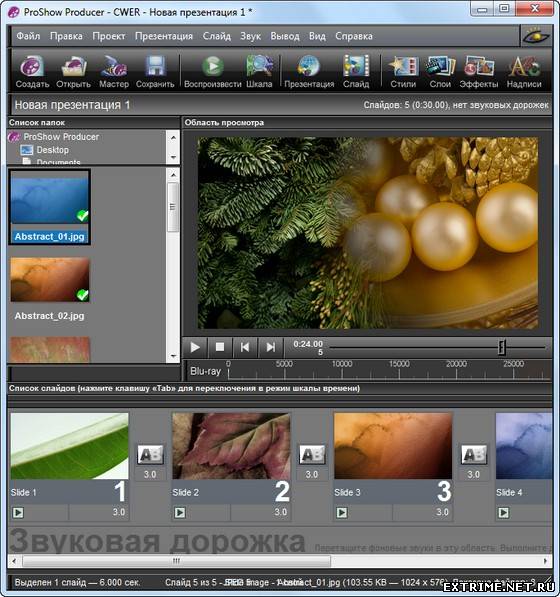
ProShow Producer – программа
для профессионального создания презентаций от Photodex. Утилита
поддерживает работу со слоями и дает возможность использовать
неограниченное число слоев для каждого слайда. Программа поддерживает
прозрачность для файлов PSD, PNG, TIFF и GIF, дает возможность
использовать маски слоя, эффекты перехода, градиентную заливку или
заливку цветом. Фотографии, из которых состоит презентация, можно
редактировать, применяя к ним такие инструменты, как повышение четкости,
изменение контрастности и насыщенности цветов. Презентация может
содержать подписи, в том числе и анимированные, фоновую музыку. Готовый
проект может быть сохранен в один из 14 форматов, в том числе в HD
Video, Flash и QuickTime. Данная версия является самой функциональной
версией из всех трех версий данной программы, а также полностью подойдет
для использования в бизнесе.
Некоторые возможности:
- Добавление неограниченного количества слоев для любого слайда
- Поддержка функции Drag-and-drop
- Поддержка более 100 форматов
- Поддержка прозрачности для PSD, PNG, TIFF и GIF файлов
- Добавление градиента или заливки как отдельного слоя для получения невероятных результатов
- Применение эффектов перехода для отдельных слоев
- Встроенные инструменты корректирования изображений (резкость, размытие, раскрашивание, насыщенность и т.д.)
- Создание расширенных рамок для ваших фото и видео
- Вырезание и поворачивание ваших фотографий и видео с точностью
- Устранение эффекта "красных глаз" с помощью встроенного инструмента
- Масштабирование по координатам X и Y индивидуально для каждого слоя
- Полностью настраиваемая сетка предпросмотра слайдов позволяет точно установить позицию для ваших фото и видео
- Контролирование шрифтов, размеров и цветов подписей к слайдам
- Анимирование подписей к слайдам с помощью различных встроенных эффектов
- Использование звукового сопровождения для ваших слайдов
- Поддержка форматов WAV и MP3 для звукового сопровождения
- Сохранение звуковых дорожек напрямую с CD-диска и прямое перетаскивание звуков в ваши слайды
- И многие другие возможности...
What's New in This Release:
New! Create Shows Automatically
- Wizard effortlessly builds complete shows with photos, videos, music and effects
- Wizard intelligently adds effects and builds a custom show with your content
- Nearly instant preview of your show - no need to wait for rendering
- Wizard shows can be edited in ProShow for full creative control
- Add photos, videos, text and music
- Control order of content, trim videos, and edit text
- Add your own custom soundtrack
- Pick from 20 different themes
- Create your own themes, and edit existing themes
- Bias the energy level to create shows that are calm, or shows that are a little crazy
New! Create Your Own Transition Effects
- Create your own transitions from within ProShow Producer
- Easily build transition effects, just like building slide styles
- Transitions can be easily traded online and transferred between machines
- Add custom icons, categories, publisher information and more
New! Over 190 New Transition Effects
- New effects you can use in any show
- Page curls, texture blends, gloss effects and more
- ProShow Producer now includes over 470 transition effects
- Add even more transitions with new Transition Packs
New! All New Transition Chooser
- Completely redesigned interface for browsing and selecting transitions
- Categories let you easily search similar effects
- See the name and description of the selected effect
- Single-click to preview, double-click to apply (or just select, and click 'Apply')
- Drag the Transition Chooser to any spot on your screen
- From the preferences, configure ProShow to open the Transition Chooser where you left it
- Resize the Transition Chooser to control how much you see at once
New! New Interface for Creating a New Show
- Improved New Show interface provides more options for starting a new show
- Launch the wizard to build a show automatically
- Create a new blank show, and specify the title and aspect ratio
- Easily access show templates to create a new show from a template
- Open any recently used show
- Browse for an existing show to open
- New Show interface opens automatically at startup (can be disabled)
New! Over 170 New Slide Styles
- Apply these new effects to any slide
- Focused on elegant and essential effects that work well in all shows
- ProShow Producer now includes 250 slide styles
New! Improved Video Creation
- Support for HD uploads to Vimeo
- Support for YouTube shows up to 15 minutes (previously limited to 10 minutes)
- Enhanced the overall quality of several video formats when using the Device Output feature
- Improved quality of MPEG 4 based video output
New! Improved Slide Editing
- Video trim values are now maintained when applying Slide Styles
- Modifiers can now be based on a specific duration instead of always scaling with slide times
- Set the highlight color for interactive captions
Other Changes and Improvements
- Folders list now provides access to Windows Music and Videos folders
- Fixed problem with audio clicks / blips at the beginning and end of audio tracks
- Fixed rare crash condition caused by adding shows to a project
- Fixed crash condition in output processes caused by trimmed / cropped video layers
- Fixed problems where layers in some shows / projects could appear black
- Fixed problems with Copy Settings dialog when accessed from Slide List
- Fixed wording in save confirmation dialog to properly indicate if the item to be saved is a show, project, or menu
- Fixed missing save confirmation process when opening show / project from outside ProShow and show is already open
- Fixed quality problem affecting left channel of AAC based video output
- Fixed problem where Windows Taskbar could cover Choose Transition dialog
- Fixed video thumbnail option for Blu-ray menus
- Fixed rare problem where progressive encoded video output could be interlaced
- Fixed problem where layer Flip options could be reset when changing source files
- Fixed problem where show tabs in projects could be too narrow
- Fixed typo in Synchronize Show to Soundtrack dialog
- Fixed problems with AAC audio in video output
- Fixed problems where the Total Time field in Slide Options could fail to update
- Fixed startup problem caused by text setting in Windows 7
- Fixed video import failure affecting some MOV files
- Fixed the Pause button in DVD disc rendering dialog
- Fixed the Preview Options entry under the More Options button in the Caption Motion tab of Slide Options
- Fixed problem where video rendering could appear to stall on some shows
- Fixed problem where changing the source file for a video layer could incorrectly update slide time
- Fixed label in list of caption texture scaling options
- Fixed problem with missing right click menu for slide background image field
- Fixed problem where current slide name could fail to appear in Rename Slide dialog
- Fixed problem where MP4 files could fail to show in open file dialogs
- Fixed problem with Vimeo output
- Fixed problems with show backgrounds set to solid color
- Fixed problem where some MP3 files could fail to import properly
|


 1.
1. 





 Хоть я и новенький, всё равно удачи рядовой vAv. Возвращайся со званием не меньше чем Сержант. Весь твой клан будет ждать твоего возвращения.
  Поправочка! еще 2 места есть!B)
